

Is PDF eXPLODE HIPAA compliant ?
ISSUE:
PDF-eXPLODE is used for emailing documents in the Occupational Health and Safety industry and Medical Record keeping industries. Is it HIPAA complaint and specifically, in relation to SYSTOC software? Do you have a SOC II audit report to verify compliance?
ANSWER:
Absolutely Yes- PDF-eXPLODE is HIPAA compliant. But let us start with identifying what HIPAA is and its requirements in regard to report(s) delivery by email.
HIPAA BASICS
HIPAA is an acronym for Health Insurance Portability and Accountability Act of 1996. It is United States of America legislation that provides for data privacy and security in order to safeguard medical information. PDF-eXPLODE does not have a connection to any software database, nor does it influence or provide any form of User management to any software program's data in any industry. PDF-eXPLODE does however assist with delivering reports (via email) that contain sensitive data information sourced from the business software's database. With that in mind, PDF-eXPLODE is aware of the need to securely and reliably deliver the reports to the intended recipient.
PDF-eXPLODE CONFIGURATION
In this article we focus mainly on the Occupational Health software of which SYTOC is one. PDF-eXPLODE is middleware which assists the User in securely delivering reports. How does it do that?
PDF-eXPLODE has features that permit the User to deliver reports securely. Let's review the processes available.
- Deliver reports as a non-editable PDF with a 128 bit password encryption which the User must configure in the relevant report tag. The following example in SYSTOC , shows how to use the [ApplyPassword] variable (in the Var1 position shown in the image below) and the [Email] command.
This is the corresponding configuration in PDF-eXPLODE Options:

- Maintain a default global password within PDF-eXPLODE (kept encrypted in 128 Bit Hex) in the configuration file. This feature works as follows:
When using the Variable password (which would supply a (password) data value, from a field in the Customer DB table): if the DB field is blank, then to ensure the document is not emailed out without being secured, you can set a password as shown on the password configuration screen below. This password would be applied as the default to the document in any batch where the Variable value, coming from the database was found to be blank in the report tag.
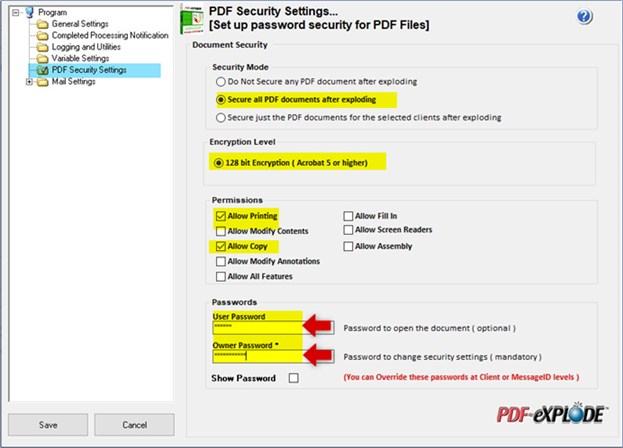
To initiate a global variable to be used as a replacement for a blank database password in the tag, you will need to ensure that the configuration item ' Apply MessageID/Global Security USER password when <Var> Pwd is blank ' is checked - as seen in the screen below :

When the receiver tries to open the report, they will be confronted with a password prompt which they have no knowledge of. The email message can test, using an IF-Then-Else formula (IIF) within your PDF-eXPLODE message text to see if the Global password configuration has been checked and if so, a message text sent out to the recipient would be adjusted to read words to the effect - "Please call our office on 215-474 9185 to find out your document's password". For example, in your message text, you can include the following as shown:
IIF(<GPWD> = 1 , ‘ A password was configured and assigned in-house, to open these documents, as your organisation has not nominated a custom password. Please call 251-290- 2433 to obtain your password to open the attached PDF ’, ‘’ )
Where:
<GPWD> is a PDF-eXPLODE internal variable that will test/determine if your parameter: ApplyGlobalPwd=1 has been set and will accordingly replace the blank Var password in the report tag with the Global password from the PDF Security Settings screen in PDF-eXPLODE Options. This will accordingly password protect the PDF, rather than email an unsecured PDF. To understand the IIF formula, if the ApplyGlobalPwd = 1 and the <Var> is blank, then the internal variable <GPWD> will be equal to ”1” and the text shown in the TRUE part of If-Then-Else Formula [ IIF() ] will be shown in the email message else a blank will exist.
- Email reports via SMTP – PDF-eXPLODE has the capability to use secure port 587 and use an encrypted Transport layer socket (StartTLS protocol) to fully secure the transport environment, as well as encrypt the email message and attachments.
SOC II AUDIT & DATA RESIDENCY
PDF-eXPLODE is a "Client-Side" middleware utility. The software is installed and executed entirely within the Customer’s own secure infrastructure or private-cloud environment. At no point is document data, Protected Health Information (PHI), or metadata transmitted to 3000AD SYSTEMS PTY LTD servers for processing, storage, or relay.
A SOC (System and Organization Controls) audit is a verifiable report issued by independent CPAs that validates how a company manages and protects the data it handles. While HIPAA is a set of US federal regulations, a SOC report is often requested by hospitals to verify that a software provider’s internal controls meet high security and privacy standards.
SOC II is specifically designed for service providers that store or process customer data in the cloud . Because PDF-eXPLODE is a local "on-premise" middleware utility, a SOC II report is not applicable to our business model. SOC II audits monitor providers who host client data on their own infrastructure— 3000AD SYSTEMS PTY LTD does neither.
Official Statement on Data Access & Business Associate Status
3000AD SYSTEMS PTY LTD officially clarifies that we do not meet the legal definition of a "Business Associate" under HIPAA regulations (45 CFR § 160.103). To assist IT and Security teams in closing their assessment, please note the following facts:
- No External Data Residency: We do not host, store, or have any remote access to client data. PDF-eXPLODE processes documents entirely within the Medical Institution's (or the SYSTOC) secure local environment.
- Zero Data Contact: We do not collect or receive Protected Health Information (PHI). The only exception is if a client voluntarily provides a de-identified processing log snippet for a specific support request.
- Local Security Control: As a local installation, the software is protected by the hospital's own existing firewalls, SOC II controls, and security protocols.
- Secure Delivery: PDF-eXPLODE supports industry-standard AES 128-bit encryption . It is the Client/User’s responsibility to configure these features to ensure outgoing reports meet their internal security policies.
Because 3000AD SYSTEMS PTY LTD has no access to the hospital's or any medical institution's data or network, the software falls outside the scope of a third-party SOC II audit and should be evaluated as a local application under the institution’s internal IT policy.
The features described above are only available to Users of Version 4.1.26 and above.
If you have any further questions in relation to compliance, please feel free to contact us with further questions at support@pdf-explode.com
 Comments

 You Can...
 Subscribe to Article
 Print Article
 Email Article to Friend
 Export to PDF
 Export to MS Word
 Article Information
 Article Rating
 Attachments
