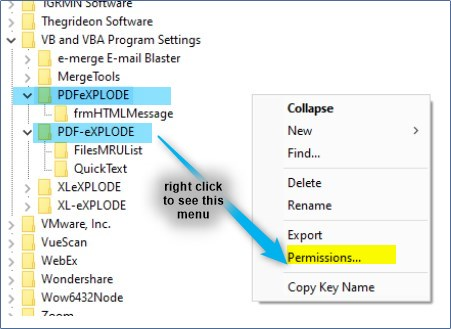
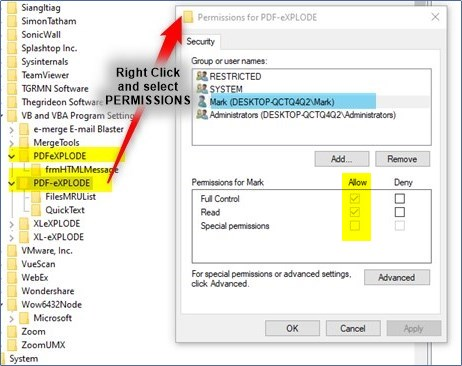
HKEY_CURRENT_USER\Software\VB and VBA Program Settings\PDF-eXPLODE ---> (application)
HKEY_CURRENT_USER\Software\VB and VBA Program Settings\PDFeXPLODE ---> (printer)
ISSUE:
I reinstalled the license you released for me yesterday. Post installation and configuration, when the user opens either the desktop shortcut or PDF-eXPLODE.exe from the install folder, it takes close to 5 minutes before it displays.
See the log lines below.
-------------------------------------------------------------------------------------------------------------------
3/10/2026 9:56:47 AM: Version 4.1.28.07.Nov 2022 Program Start - ******
3/10/2026 10:01:07 AM: PDFeXPLODE LOGs Folder path - C:\PDF-eXPLODE\LOGS\adam
3/10/2026 10:01:07 AM: PDF-eXPLODE INI file path: C:\PDF-eXPLODE\INIs\adam\PDFeXplode.ini
3/10/2026 10:01:07 AM: Temp Folder is : C:\PDF-eXPLODE\TEMP\adam\
3/10/2026 10:02:28 AM: Version 4.1.28.07.42307.Nov 2022 Program End - ******
-------------------------------------------------------------------------------------------------------------------
ANSWER:
It appears to me that the User may have a corrupt user profile which is a notorious "silent killer" for start-up performance, and it fits the timestamps shown in the log.
9:56:47 AM: Program Start
10:01:07 AM: Logs/INI path identified
Analysis: This is the most significant delay. Between the moment the .exe is double-clicked and the moment it successfully identifies its own configuration files, over 4 minutes pass. This is almost certain that the program PDF-eXPLODE which reads the Registry on start-up to determine various environment variable values, start-up install folder and list of installed printers on the target PC/server via the registry. It is possible that the Antivirus/EDR (Endpoint Detection and Response) scanning could be causing the delay, but the main culprit in most cases I encountered, has been a corruption of the Start-up User profile
10:01:07 AM: Paths identified
10:02:28 AM: Program End (User likely closed it or it timed out)
Analysis: Once the paths are known from the registry, it still takes 81 seconds to finish loading (or in this case, closing). If the user clicked 'Close' on the app intentionally immediately after 10:02:28 AM, then this suggests that the app closed 1 minute 21 seconds after requesting a close. This usually points to an additional issue of Printer communication. The software is likely struggling to "handshake" with the PDF-eXPLODE printer driver or a default system printer that is offline/unreachable.
Why does PDF-eXPLODE take so long to display, yet others don't?
Unlike a lot of other programs, at the start up, PDF-eXPLODE needs to query the registry to find its license, the install folder , environment variables and printer settings. This leads us to believe one of 2 issues exists here:
When a Windows profile is damaged, the OS struggles to resolve basic environmental variables and registry hives (like HKEY_CURRENT_USER). At start up, PDF-eXPLODE queries the Window's registry key {HKEY_LOCAL_MACHINE} in addition to other keys previously mentioned. In the log, at the 9:56:47 AM mark, a corrupt profile would cause Windows to hang while it repeatedly retrying those registry calls.
Here is how you can confirm if it’s the profile:
How to Test this:
Can you get a different user or any non-admin person to perform these two quick tests to narrow it down:
Note:
Recommendation for the User
If the "Different User" test proves the profile is the issue, the most effective solution seems to be (based on 10 Client sites acreoss US, UK, Australia and Europe was to rebuild the Windows user (Adam) profile. This involves recreating C:\USERS\ADAM\ Folder with contents and the login script. This will regenerate the NTUSER.DAT db for this user. However your IT department may want to investigate and fix these first:
HKEY_CURRENT_USER\Software\VB and VBA Program Settings\PDF-eXPLODE ---> (application)
HKEY_CURRENT_USER\Software\VB and VBA Program Settings\PDFeXPLODE ---> (printer)
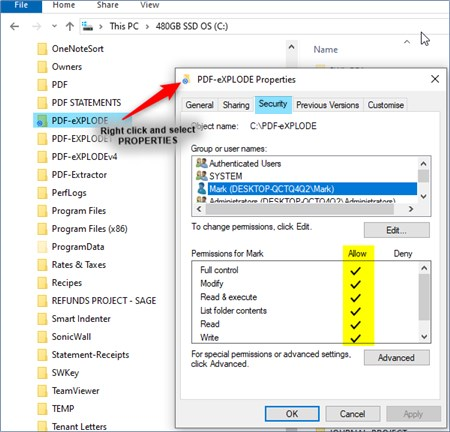
If the above 2 suggestions don't make a difference in the start-up of PDF-eXPLODE.EXE, then rebuild the User Profile thereby regenerating a new NTUSER.DAT db for this User.
Article ID: 142
Created On: Wed, Mar 11, 2026 at 2:00 PM
Last Updated On: Mon, Mar 16, 2026 at 9:13 AM
Online URL: https://kb.pdf-explode.com/article/why-does-it-take-up-to-5-minutes-to-open-pdf-explode-for-a-couple-of-our-users-in-our-network-142.html