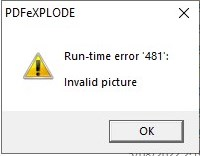
When I click PDF-eXPLODE.exe or the Desktop shortcut to start PDF-eXPLODE, I get an error ’481 - Invalid Picture’
ISSUE:
When I click the PDF-eXPLODE.exe to start the program I get an error 481 as shown in the image here:
How do I fix it?
ANSWER:
Here are the likely associated causes of this error and suggested fixes
Cause of the error (listed in order of likelihood)
- Insufficient disk space: Particularly in the Windows Temp directory or Optional Work Drive.
- Memory leak or resource exhaustion: If the system is low on RAM or handles, image rendering can fail
- Corrupt or missing image file: The app may reference a BMP, ICO, or other image that’s not present or unreadable.
Fixes to Try
- Clear TEMP directories
- Right-click This PC > Properties > Advanced System Settings > Environment Variables.
- Locate the path to the TEMP and TMP paths and then clear out old files in those folders to release some usable space.
- Run app as Administrator (ONLY AS A TEST)
- Right-click PDF-explode.exe and choose Run as administrator—helps with understanding if some local environment changes have occurred with permissions and resource access.
- Test on a clean machine
- Try running the app on a fresh Windows install or VM to isolate whether it’s environment-specific.
Article ID: 133
Created On: Tue, Sep 16, 2025 at 10:30 AM
Last Updated On: Sat, Dec 20, 2025 at 9:03 AM
Online URL: https://kb.pdf-explode.com/article/when-i-click-pdf-explode-exe-or-the-desktop-shortcut-to-start-pdf-explode-i-get-an-error-481-invalid-picture-133.html