When I drag and drop a PDF on to PDF-eXPLODE window, it starts printing to the PDFeXPLODE printer instead of splitting and emailing
ISSUE:
I have been dragging and dropping PDFs on the PDF-eXPLODE print queue window. What normally happens next is the program immediately starts exploding (or splitting) the pages of the PDFs and finally emails them. Lately, the moment I drag and drop the PDF on to the PDF-eXPLODE print queue, it invokes the PDFeXPLODE printer and prints the PDF but no explode or emailing occurs. I cannot figure what has changed in my Windows environment to cause the explode and email to fail all the time.
ANSWER:
If the drag and drop is executing a "Print" instead of the usual explode and email, the print is created by Windows in postscript language level 3. Our PDF engine is incappable of reading language level 3 - rather it only reads level 2. Although a new copy of the existing dragged PDF is created, it does not explode nor email as language level 3 prevent the engine from deciphering the hidden PDF tag which exists in the PDF. Hence no further action occurs.
However, the real issue appears to be, why is drag and drop onto the PDF-eXPLODE print queue resulting in NO exploding. Let us investigate what could be occuring in your PC or network environment.
- Open one of the PDFs you are dragging and dropping with a right click and select Properties from the popup menu
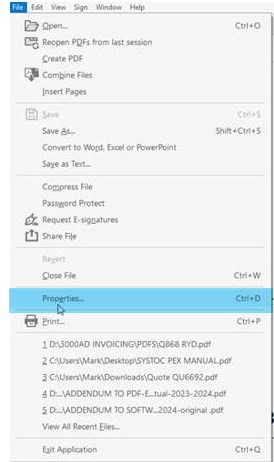
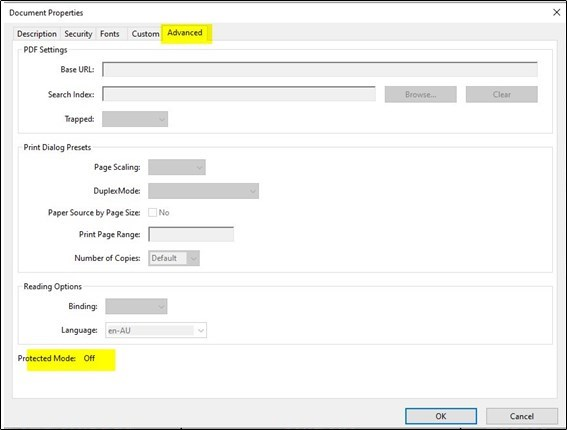
- When Properties open, click the ADVANCED tab and check Protected Mode (highlighted yellow) on the bottom of that screen. Verify if is shows as Off or On. More than likely, it will show as 'On'. 'Protected mode' in Adobe Reader is the most likely cause of drag and drop being converted to a "print" instead of an explode.
-
-
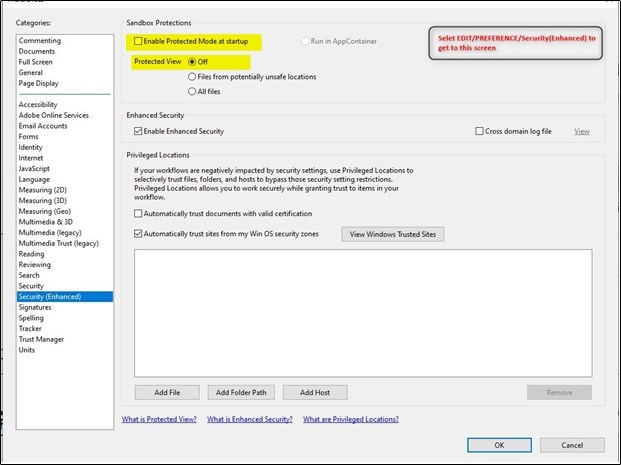
Close above screen. Now click in the Adobe Reader app, EDIT menu/Preferences and the screen shown below, will open. Select Security (Enhanced) on the left and then UNCHECK the box Enable Protected Mode at startup if it is checked. Protected View - Off should display.
-
- Close Adobe Reader completely
- Now try Drag and Drop again
Article ID: 127
Created On: Mon, Dec 12, 2022 at 12:32 AM
Last Updated On: Mon, Dec 12, 2022 at 9:10 AM
Online URL: https://kb.pdf-explode.com/article/when-i-drag-and-drop-a-pdf-on-to-pdf-explode-window-it-starts-printing-to-the-pdfexplode-printer-instead-of-splitting-and-emailing-127.html