

Can I create multilevel archive folders on the fly when exploding and emailing my reports?
ISSUE:
I need to archive my Invoices each month by Salesman and then for each Salesman, save each Invoice under the relevant Client sub-folder. None of the folders exist prior to starting the PDF-eXPLODE processing. We provide our Sales staff access to archived Invoices for Client follow ups. We do have a large number of Sales staff with a regular turnover, so it is not practical in advance to pre-create the folders for each Salesman and their Clients. Is it possible for PDF-eXPLODE to create the Salesman and Client sub-folder paths during the explode process and then archiving all invoices into the relevant Client sub-folder?
ANSWER:
PDF-eXPLODE is capable of creating multiple level nested folders on the fly through the 'Variable' folder functionality, The best way to discuss this, is by providing an example of how you would create the tag in your report to create a nested folder by Client, within each Salesman. Windows will only permit a Client folder creation if the Salesman (parent) folder exists.
It is essential to determine the order of folder creation (referred to as a 'hierarchy'). The hierarchy for Salesman / Client and then Invoices sorted by month would be:
- Salesperson
- Client 1, Client 2, Client 3...
- all exploded invoices are saved in this folder
To achieve the above, open the Variables menu item in the PDF-eXPLODE Options. Next configure the Variables filename and sub-folder as you see in the graphics.
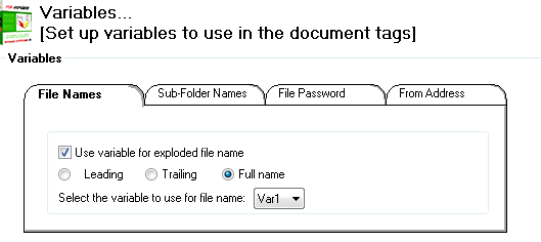
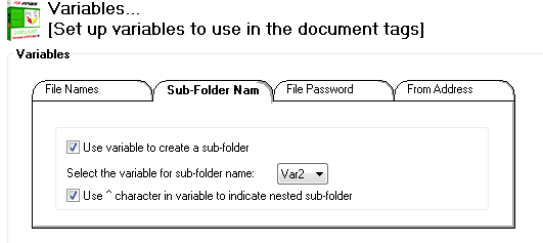
Now in your document, set up your tag to match the Variable configuration.
<pdfexplode> { Invoice_No }, { Salesman_Name } ^ { Client_Name }% { email_addr } </pdfexplode>
{} around the variables signifies a database field name
When the report is run, the tag will be populated with (say) record 1 from the database. In that record, the Client email address, Client name, Invoice No. and the Client's Sales person will be entered in. When the next Invoice is viewed on-screen, the data relevant to record 2 fills the tag template with the relevant Invoice number, Sales person and Client name. PDF-eXPLODE will create the Sales person folder and then the client sub-folder within this Salesperson. If the folder already exists, PDF-explode will not attempt to recreate it. Once the folder(s) are created, the Invoice will be placed in this Client folder.
You can attempt to create the following Pay stub structure for a Payroll service bureau:
- Company (A or B or C...)
- Employees (of Company A or B or C...)
- Pay Period run (a date when pay was run in the format YYYY-MM)
- Employees (of Company A or B or C...)
Your tag must look something like this:
<pdfexplode> { Pay_stub_advice_no }, { Company_ID } ^ { Employee_num } ^{ Year_Month} %{ email_addr } </pdfexplode>
 Comments

 You Can...
 Subscribe to Article
 Print Article
 Email Article to Friend
 Export to PDF
 Export to MS Word
 Article Information
 Article Rating
 Attachments
